- C++ 85.1%
- C 8.8%
- Shell 4%
- Makefile 1.9%
- Python 0.2%
| Filename | Latest commit message | Latest commit date |
|---|---|---|
| .github | ||
| dist | ||
| man | ||
| src | ||
| testsuite | ||
| unittests | ||
| .clang-format | ||
| .gitignore | ||
| CONTRIBUTING.md | ||
| dist_config.py | ||
| README.md | ||

The Tilde Text Editor
Tilde is a text editor for the console/terminal, which provides an intuitive interface for people accustomed to GUI environments such as Gnome, KDE and Windows. For example, the short-cut to copy the current selection is Control-C, and to paste the previously copied text the short-cut Control-V can be used. As another example, the File menu can be accessed by pressing Meta-F.
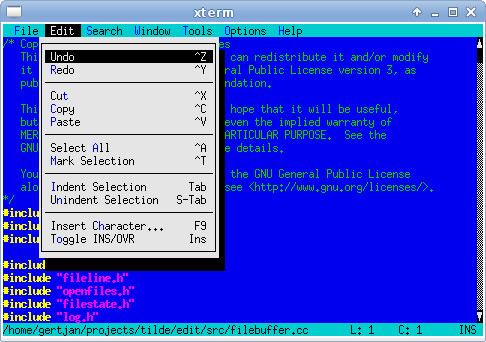
For more information, see the homepage
Installing Tilde
The easiest way to install Tilde is by using the repositories from the Tilde homepage download section. If there are no binary packages provided for your distribution or hardware, you can still build Tilde from the official releases provided there. Be aware that Tilde depends on several support libraries, which are also provided through the Tilde homepage.
Building from the official release is recommended over attempting to build from the git repositories for installing Tilde. Only for development of Tilde should the git repositories be used.
Getting help
There are several ways to get help, should you have problems using, installing or building Tilde:
- Questions and discussions can be posted on the mailing list tilde-text-editor <at> googlegroups.com.
- For bug reports or feature suggestions, please file a bug in the github bugtracker.
Developing Tilde
To help developing Tilde, you will need to build Tilde from the git repositories. The repositories assume that all parts of Tilde, i.e. Tilde itself and its support libraries, are built from the git repositories. Please follow the steps below to build Tilde from the git repositories:
- Install the dependencies of Tilde from the system libraries. On a typical
Debian/Ubuntu system this would include (packages for OpenSUSE and Fedora
have similar names):
- flex
- gettext
- libacl1-dev
- libattr1-dev
- libgpm-dev
- libncurses-dev (called
libncurses5-devon older distributions) - libpcre2-dev
- libtool-bin
- libunistring-dev
- libxcb1-dev and/or libx11-dev
- pkg-config
- LLnextgen — download the
.debpackage from the download page and install it withsudo apt install ./llnextgen_*.deb - clang (unless building using COMPILER=gcc)
- Clone the repositories:
for i in makesys transcript t3shared t3window t3widget t3key t3config t3highlight tilde ; do
    git clone https://github.com/gphalkes/$i.git
done
- Build all packages:
./t3shared/doall --skip-non-source --stop-on-error make -C src
Once the build is complete, tilde/src/.objects/edit is the newly compiled
tilde. If the termdebug suite of tools
is installed, then tilde/src/tedit can be used to run the editor while
recording the input and output for debugging purposes.
Other ways to contribute
- Creating and maintaining packages for different distributions.