- C 99.6%
- Makefile 0.4%
| Filename | Latest commit message | Latest commit date |
|---|---|---|
| docs | ||
| autopilot.c | ||
| autopilot.h | ||
| draw.c | ||
| draw.h | ||
| LICENSE | ||
| main.c | ||
| makefile | ||
| README.md | ||
| snake.c | ||
| snake.h | ||
| sssnake | ||
| structs.c | ||
| structs.h | ||
| termbox.h | ||
| xymap.c | ||
| xymap.h | ||

sssnake
The classic snake game for the terminal that can play itself and be used like a screensaver.

Installation
No external dependencies required. Just clone and build:
git clone https://github.com/AngelJumbo/sssnake.git
cd sssnake
make
sudo make install
Usage
You can check the manpage or use the -h option to see the details of what this program can do. So instead I would like to show you a few things that I like to run.
sssnake -m autopilot -s 15 -j 10
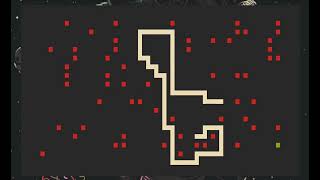
sssnake -m autopilot -s 15 -z -t -l ascii
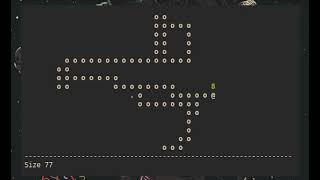
sssnake -m screensaver -s 15 -z -x 8 -y 8 --try-hard 1
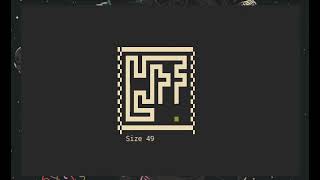
Planned features
Definitely be added
Pause keySpacebar is now the pause key.Increase and decrease speed keysYou can increase or decrease the speed with + and - in autopilot/screensaver modes.An alternative/replacement to the A* algorithm (probably BFS)BFS is now available with:--short-path=bfs.
May be added
- Hamiltonian cycles.
- Custom colors.
- IDA* to find the shortest path.
Faq
Can I control the snake?
Yes, that's the default mode or you can try the arcade mode where the game increases the speed every time you eat. The controls are wasd, the arrow keys or hjkl(vim keys).
Does the snake fills the entire screen/terminal with the autopilot?
If you use the "--try-hard" options the snake will get pretty close and sometimes it will fill the terminal. I implemented two algorithms "--try-hard 1" is good for big terminals/boards. You can test it running:
sssnake -m autopilot -s 15 --try-hard 1
"--try-hard 2" uses more cpu and it can get laggy with big boards but it has more chances to fill the board. Try:
sssnake -m autopilot -s 10 -x 10 -y 10 --try-hard 2
Neither of the two algorithms works well with junk.
Why the name "sssnake"?
All the snake games in the terminal that I found use ASCII characters and, let's be honest, they are kinda ugly. I tried to do something more visually appealing, something "sexy", and since it can play itself it is also "smart". Smart and sexy snake => sssnake.
A* vs BFS
At first this project was just an implementation of A* in the snake game. After finding chuyangliu's project I implemented their greedy solver with my A* instead of their BFS. Noticing that the behavior of the two implementations is different, I decided to implement BFS in this project as well as an alternative to A*. You can see the result here:
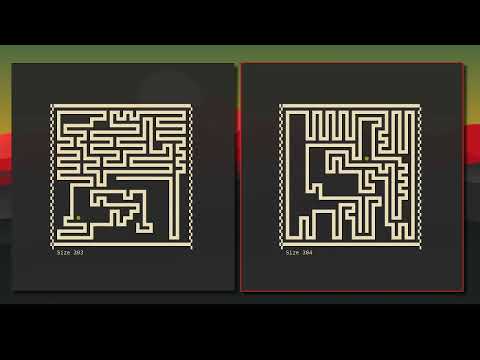
Commands of the video: For A*:
sssnake -m autopilot -x 20 -y 20 -s 17 --try-hard 2 -z
For BFS:
sssnake -m autopilot -x 20 -y 20 -s 17 --try-hard 2 -z --short-path=bfs
Credits
- Min heap implementation base on Martin Broadhurst min-heap ( http://www.martinbroadhurst.com/min-heap-in-c.html )
- A* base on (https://www.geeksforgeeks.org/a-search-algorithm/)
- The two "--try-hard" algorithms that I implemented were inspired by chuyangliu's greedy solver ( https://github.com/chuyangliu/snake/blob/master/docs/algorithms.md#greedy-solver )