- Shell 100%
| Filename | Latest commit message | Latest commit date |
|---|---|---|
|
|
||
| .github | ||
| bin | ||
| examples | ||
| src | ||
| .gitignore | ||
| banner.png | ||
| book.toml | ||
| CODE_OF_CONDUCT.md | ||
| CONTRIBUTING.md | ||
| LICENSE | ||
| license-apache-2.0.svg | ||
| made-with-bash.svg | ||
| main.sh | ||
| my_repo_deets.png | ||
| OSCG_CONTRIBUTOR_Guidelines.md | ||
| OSCG_MENTOR_Guidelines.md | ||
| README.md | ||
| SECURITY.md | ||
| tokei_output.png | ||

Arduino Interactive CLI (aci)









A user-friendly interactive CLI tool that bridges the gap between Arduino IDE and arduino-cli, perfect for developers transitioning to command-line workflows.
Overview
Arduino Interactive CLI (aci) is designed for developers who want to harness the power of arduino-cli without the intimidation of raw command-line interfaces. It provides an intuitive, menu-driven experience while maintaining the efficiency and control of CLI workflows.
Perfect for:
- Developers transitioning from Arduino IDE to CLI
- Advanced users seeking faster workflows
- Anyone who wants a polished TUI experience for Arduino development
Features
Current Features ✅
- Board Management: Select and configure Arduino boards with ease
- Sketch Operations: Create, edit, compile, and upload sketches
- Bootloader Support: Upload for both old and new bootloaders
- Library Management:
- Install libraries from the Arduino ecosystem
- View installed libraries
- Search and compile library examples
- Core Installation: Support for ESP8266, ESP32, and other 3rd-party cores
- Serial Monitor: Built-in serial communication (V1.0.3+)
- Auto-dependency Management: Automatically installs required tools
- Beginner-Friendly Examples: Built-in starter code (Blink, Serial, etc.)
Coming Soon 🚧
- TL;DR documentation for quick reference
- Nushell and Fish shell support
Quick Start
Try before installing:
curl -sSL https://raw.githubusercontent.com/Vaishnav-Sabari-Girish/arduino-cli-interactive/refs/heads/main/bash_shell_script/main.sh | bash
Installation
Recommended: Homebrew
The easiest installation method with automatic dependency management:
brew install vaishnav-sabari-girish/arduino-cli-interactive/aci
First-time setup:
-
Create a GitHub Personal Access Token (PAT) for update notifications:
- Visit GitHub Token Settings
- Create a "Tokens (Classic)" with
repopermissions
-
Add to your shell configuration (
~/.bashrcor~/.zshrc):export ACI_GITHUB_TOKEN="your_token_here" -
Reload your shell:
source ~/.bashrc # or ~/.zshrc
Alternative: Basher
For Bash script package manager users:
basher install Vaishnav-Sabari-Girish/arduino-cli-interactive
Run with: aci.sh
Note: Manual installation of dependencies required: gum, timer, arduino-cli, and homebrew. If using Basher, ensure Homebrew is installed and added to your PATH.
To upgrade:
basher uninstall Vaishnav-Sabari-Girish/arduino-cli-interactive
basher install Vaishnav-Sabari-Girish/arduino-cli-interactive
From Source
Clone from your preferred platform:
# GitHub
git clone https://github.com/Vaishnav-Sabari-Girish/arduino-cli-interactive.git

# Codeberg
git clone https://codeberg.org/Vaishnav-Sabari-Girish/arduino-cli-interactive.git

# Gitea
git clone https://gitea.com/Vaishnav-Sabari-Girish/arduino-cli-interactive.git

cd bash_shell_script
chmod +x main.sh
./main.sh
Add to your shell configuration:
alias aci="/path/to/arduino-cli-interactive/bash_shell_script/main.sh"
Then reload: source ~/.bashrc or source ~/.zshrc
Prerequisites
Note: Homebrew installation handles dependencies automatically. Manual installation only needed if installing from source or using Basher.
1. arduino-cli
Recommended: Homebrew
If you don't have Homebrew installed:
macOS/Linux:
/bin/bash -c "$(curl -fsSL https://raw.githubusercontent.com/Homebrew/install/HEAD/install.sh)"
Windows Users: Use Windows Subsystem for Linux (WSL) and follow Linux instructions. Learn WSL: NetworkChuck's WSL Tutorial
After installing Homebrew:
brew update
brew install arduino-cli
Alternative: Installation Script (Linux/macOS/WSL only)
curl -fsSL https://raw.githubusercontent.com/arduino/arduino-cli/master/install.sh | sh
Pre-built Binaries: Available at arduino-cli releases
2. gum
A TUI framework by Charm:
# macOS or Linux
brew install gum

# Arch Linux
pacman -S gum

# Nix
nix-env -iA nixpkgs.gum

# Flox
flox install gum

# Windows (via WinGet or Scoop) - WSL recommended
winget install charmbracelet.gum
scoop install charm-gum
3. timer
Interactive progress bar alternative to sleep:
brew install caarlos0/tap/timer
Usage
Initial Setup
Install Arduino AVR core for basic boards:
arduino-cli board listall
arduino-cli core install arduino:avr
Running aci
Simply type aci in your terminal (or aci.sh if installed via Basher).

Updating
Homebrew
brew update && brew upgrade aci
From Source
# Delete old installation, then:
git clone https://github.com/Vaishnav-Sabari-Girish/arduino-cli-interactive.git
cd bash_shell_script
chmod +x main.sh
./main.sh
Basher
basher uninstall Vaishnav-Sabari-Girish/arduino-cli-interactive
basher install Vaishnav-Sabari-Girish/arduino-cli-interactive
Uninstalling
brew uninstall aci
brew untap vaishnav-sabari-girish/arduino-cli-interactive
Documentation
Repository Information


Generated using onefetch and tokei
Contributing
We welcome contributions! Please see our guidelines:
Community & Links



Featured On:
License
Licensed under Apache 2.0
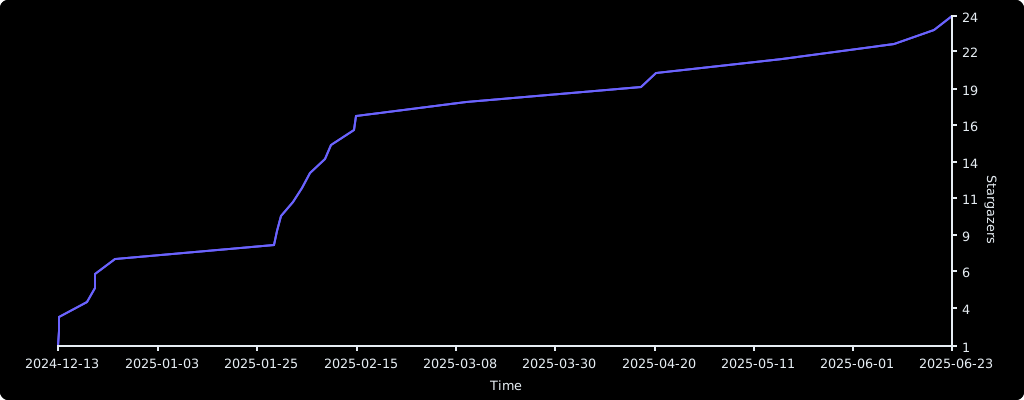
Stargazers over Time