- HCL 50.8%
- Shell 49.2%
| Filename | Latest commit message | Latest commit date |
|---|---|---|
 d404ca5b29
Co-authored-by: hashicorp-copywrite[bot] <110428419+hashicorp-copywrite[bot]@users.noreply.github.com> |
||
| _docs | ||
| examples | ||
| modules | ||
| .gitignore | ||
| CODEOWNERS | ||
| custom-data-client.sh | ||
| custom-data-server.sh | ||
| LICENSE | ||
| MAIN.md | ||
| main.tf | ||
| NOTICE | ||
| outputs.tf | ||
| README.md | ||
| variables.tf | ||
DISCLAIMER: This is no longer supported.
Moving forward in the future this repository will be no longer supported and eventually lead to deprecation. Please use our latest versions of our products moving forward or alternatively you may fork the repository to continue use and development for your personal/business use.
Nomad Azure Module
This repo contains a Module for how to deploy a Nomad cluster on Azure using Terraform. Nomad is a distributed, highly-available data-center aware scheduler. A Nomad cluster typically includes a small number of server nodes, which are responsible for being part of the concensus protocol, and a larger number of client nodes, which are used for running jobs:
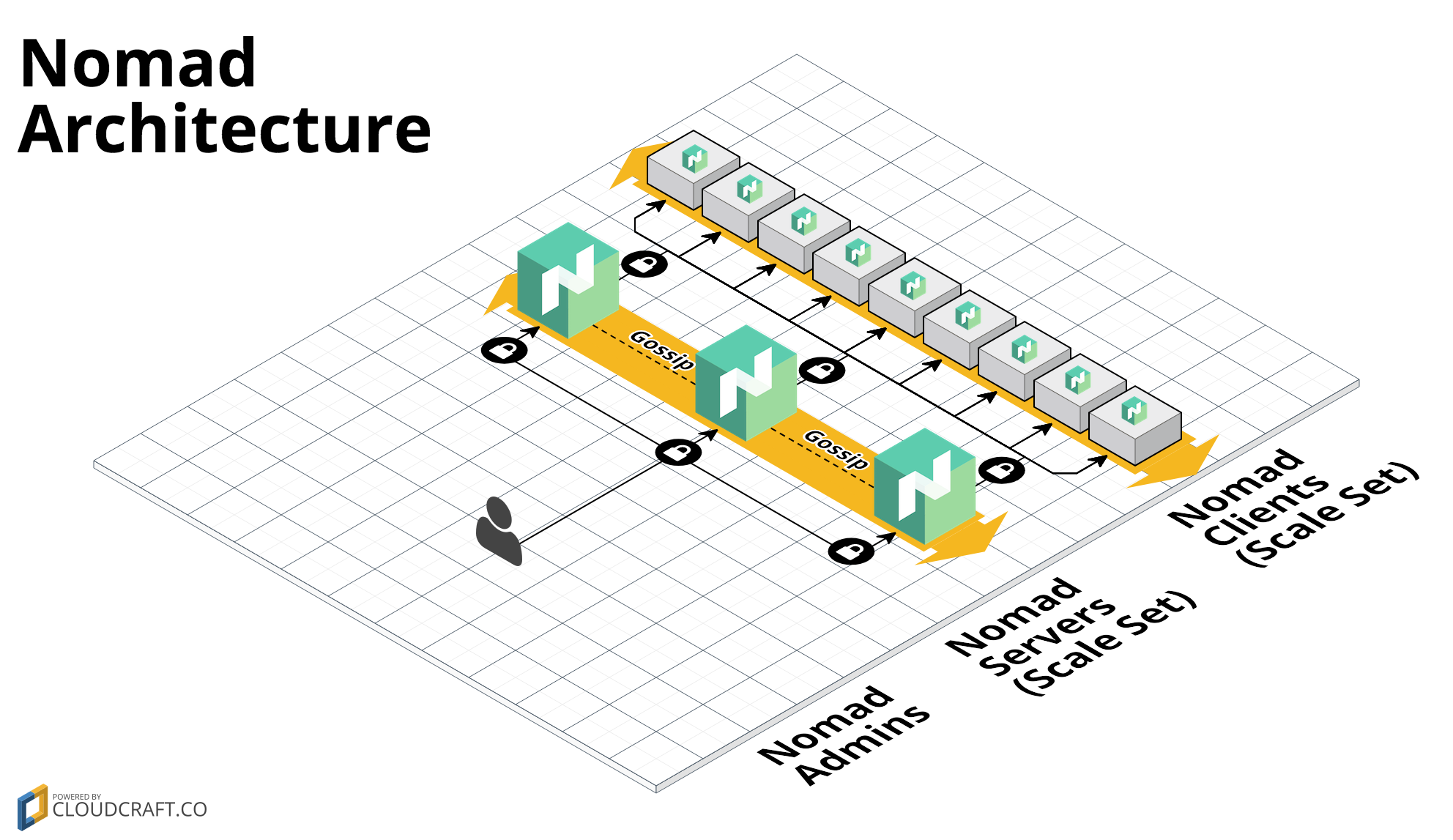
This Module includes:
-
install-nomad: This module can be used to install Nomad. It can be used in a Packer template to create a Nomad Azure Managed Image.
-
run-nomad: This module can be used to configure and run Nomad. It can be used in a User Data script to fire up Nomad while the server is booting.
-
nomad-cluster: Terraform code to deploy a cluster of Nomad servers using Scale Set.
What's a Module?
A Module is a canonical, reusable, best-practices definition for how to run a single piece of infrastructure, such as a database or server cluster. Each Module is created primarily using Terraform, includes automated tests, examples, and documentation, and is maintained both by the open source community and companies that provide commercial support.
Instead of having to figure out the details of how to run a piece of infrastructure from scratch, you can reuse existing code that has been proven in production. And instead of maintaining all that infrastructure code yourself, you can leverage the work of the Module community and maintainers, and pick up infrastructure improvements through a version number bump.
Who created this Module?
These modules were created by Gruntwork, in partnership with HashiCorp, in 2017 and maintained through 2021. They were deprecated in 2022 in favor of newer alternatives (see the top of the README for details).
How do you use this Module?
Each Module has the following folder structure:
- modules: This folder contains the reusable code for this Module, broken down into one or more modules.
- examples: This folder contains examples of how to use the modules.
- test: Automated tests for the modules and examples.
Click on each of the modules above for more details.
To run a Nomad cluster, you need to deploy a small number of server nodes (typically 3), which are responsible for being part of the concensus protocol, and a larger number of client nodes, which are used for running jobs. You must also have a Consul cluster deployed (see the Consul Azure Module) in one of the following configurations:
Deploy Nomad and Consul in the same cluster
- Use the install-consul module from the Consul Azure Module and the install-nomad module from this Module in a Packer template to create an Azure Image with Consul and Nomad.
- Deploy a small number of server nodes (typically, 3) using the consul-cluster
module. Execute the
run-consul script and the
run-nomad script on each node during boot, setting the
--serverflag in both scripts. - Deploy as many client nodes as you need using the nomad-cluster module. Execute the
run-consul script and the
run-nomad script on each node during boot, setting the
--clientflag in both scripts.
Check out the nomad-consul-colocated-cluster example for working sample code.
Deploy Nomad and Consul in separate clusters
- Deploy a standalone Consul cluster by following the instructions in the Consul Azure Module.
- Use the scripts from the install-nomad module in a Packer template to create a Nomad Azure Image.
- Deploy a small number of server nodes (typically, 3) using the nomad-cluster module. Execute the
run-nomad script on each node during boot, setting the--serverflag. You will need to configure each node with the connection details for your standalone Consul cluster. - Deploy as many client nodes as you need using the nomad-cluster module. Execute the
run-nomad script on each node during boot, setting the
--clientflag.
Check out the nomad-consul-separate-cluster example for working sample code.
How is this Module versioned?
This Module follows the principles of Semantic Versioning. You can find each new release, along with the changelog, in the Releases Page.
During initial development, the major version will be 0 (e.g., 0.x.y), which indicates the code does not yet have a
stable API. Once we hit 1.0.0, we will make every effort to maintain a backwards compatible API and use the MAJOR,
MINOR, and PATCH versions on each release to indicate any incompatibilities.
License
This code is released under the Apache 2.0 License. Please see LICENSE and NOTICE for more details.